
記事内に商品プロモーションが含まれる場合があります
今回はCSSのコピペで使える引用ボックスデザインのサンプルを30個作ってみました。引用タグ(blockquote)のデザインをサクッと変えることができます。画像を使わずに表示できます。Font Awesome版には、HTMLとCSSに加えてFont AwesomeのWeb FontsとCSSの読込みが必要です。ブログやWebサイト運営者の方は、是非ご利用くださいませ。
使い方
デザインを紹介する前に、使い方を簡単に説明しておきます。
CSSをコピーして貼付け
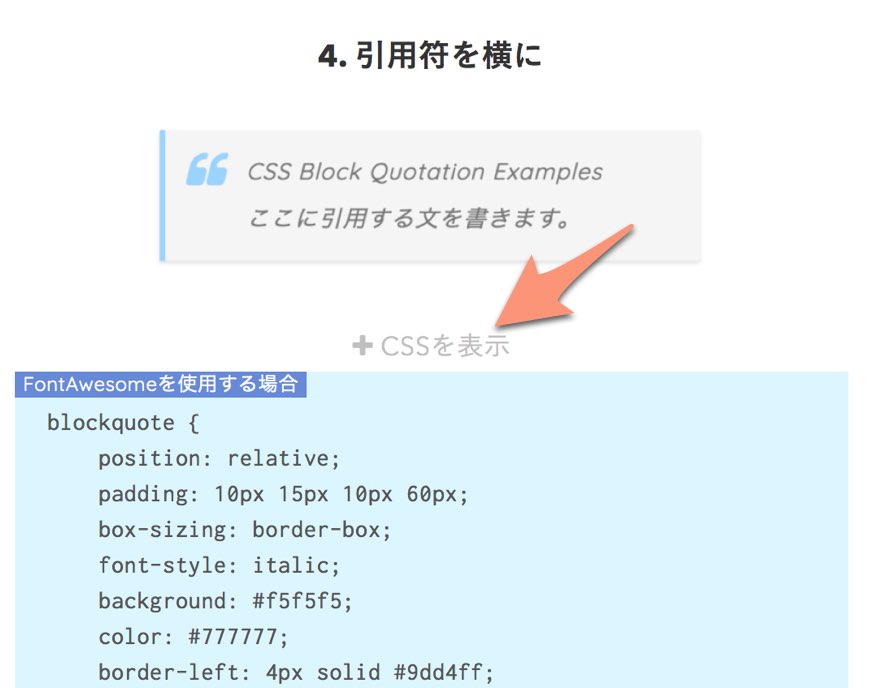
気に入ったデザインがあれば「コードを表示」をクリックしてください。CSSが表示されます。画像は記事制作時の画面です。
【HTML】引用文の書き方はいつも通りでOK
30個のサンプルでは、どれも以下のHTMLを使用しています。
<blockquote>
        <p>CSS Block Quotation Examples</p>
        <p>ここに引用する文を書きます。</p>
</blockquote>CSSでは、引用タグ<blockquote>とその中のpタグに対して、スタイル指定をしています。そのため、特別な引用文の書き方をする必要はありません。いつも通りの引用の仕方をすればデザインが反映されるかと思います。
引用元の作品名とURLを示す
cite要素は引用した作品の題名を表します。引用元URLはblockquoteのcite属性で指定できますが、この属性だけでは画面に表示されません。自分で添える出典は引用文の外に置きます。次の例では、blockquoteの直後の段落にblockquote-sourceクラスを付けています。
<blockquote cite="https://example.com/work">
  <p>ここに引用する文を書きます。</p>
</blockquote>
<p class="blockquote-source">出典:<cite>作品名</cite></p>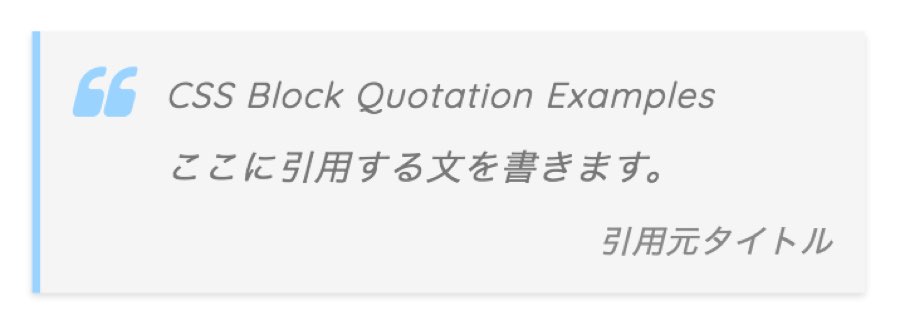
画像は旧版で出典をボックス内に表示した例です。現在のコードでは出典を引用ボックスの外に置き、右寄せの小さい文字で表示します。
引用文と、自分で追加する出典の説明を区別してマークアップしましょう。
できればFontAwesome用のコードを使う
CSSは、以下の2種類を載せています。
- FontAwesomeにより引用符「」を表示しているもの
- 全角文字により引用符「“」を表示しているもの
②の場合、閲覧環境により表示が変わってしまいます。できればFontAwesomeを使用したコードの方を使うことをおすすめします。また、一部のデザインではFontAwesomeが必須となっています。
「何の話?」という方は、お手数ですがこちらの記事を読んでみてください。
Font Awesome 7 Freeを使う場合
以下のFont Awesome版は、Font Awesome 7 FreeのWeb Fonts+CSS方式でSolidフォントを読み込んで使います。導入は公式のWeb Fonts手順に従い、fontawesome.css・solid.cssと対応するwebfontsを配置してください。font-family: "Font Awesome 7 Free";、font-weight: 900;、font-style: normal;を疑似要素に指定しています。SVG+JavaScript方式は、このCSSだけでは同じように動きません。Font Awesomeの表示方式の説明も確認してください。
はてなブログで使う場合
はてなブログの方は、CSSのblockquoteの前に.entry-contentと記載するときちんと適用されやすくなるはずです。
.entry-content blockquote {
  position: relative;
  padding: 1em;
  background: #efefef;
}
.entry-content blockquote::before {
  content: "“";
}
.entry-content blockquote p {
  margin: 0;
}
.entry-content blockquote + .blockquote-source {
  font-style: normal;
}以下は実行可能なCSS例です。.entry-contentを付けるとセレクタの詳細度は上がりますが、適用の優先順位には出所・重要度・カスケードレイヤー・記述順なども関係します。競合するテーマの指定も確認してください。
文字を斜体にしたくない場合
引用文を通常の文字にしたい場合は、blockquote本体のfont-style: italic;をfont-style: normal;に変更します。指定を削除するだけでは親要素の斜体を継承する場合があります。アイコンの疑似要素にはfont-style: normal;を指定したままにしてください。
blockquoteのCSSデザインサンプル集
1. シンプル
コードを表示
blockquote {
    position: relative;
    padding: 30px 15px 8px 15px;
    box-sizing: border-box;
    font-style: italic;
    background: #efefef;
    color: #555;
}

blockquote::before{
    display: inline-block;
    position: absolute;
    top: 13px;
    left: 15px;
    content: "\f10d";
    font-family: "Font Awesome 7 Free";
    font-style: normal;
    color: #cfcfcf;
    font-size: 28px;
    line-height: 1;
    font-weight: 900;
}

blockquote p {
    padding: 0;
    margin: 10px 0;
    line-height: 1.7;
}

blockquote + .blockquote-source {
    display: block;
    text-align: right;
    color: #888888;
    font-size: 0.9em;
}blockquote {
position: relative;
padding: 30px 15px 8px 15px;
box-sizing: border-box;
font-style: italic;
background: #efefef;
color: #555;
}
blockquote::before{
display: inline-block;
position: absolute;
top: 5px;
left: 3px;
content: "“";
font-family: sans-serif;
color: #cfcfcf;
font-size: 90px;
line-height: 1;
}
blockquote p {
padding: 0;
margin: 10px 0;
line-height: 1.7;
}
blockquote + .blockquote-source {
display: block;
text-align: right;
color: #888888;
font-size: 0.9em;
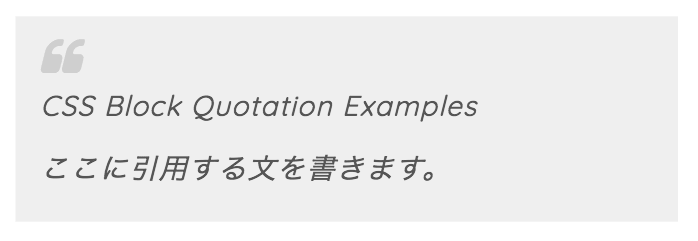
}まずはオーソドックスなデザインから。どんなサイトにも馴染みやすいはずです。
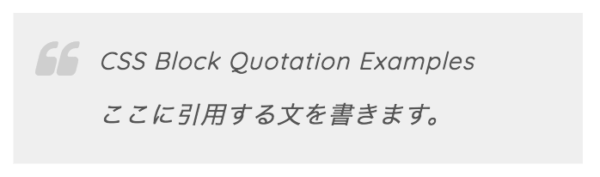
2. 引用符を横につけた場合
コードを表示
blockquote {
    position: relative;
    padding: 10px 15px 10px 60px;
    box-sizing: border-box;
    font-style: italic;
    background: #efefef;
    color: #555;
}

blockquote::before{
    display: inline-block;
    position: absolute;
    top: 18px;
    left: 15px;
    content: "\f10d";
    font-family: "Font Awesome 7 Free";
    font-style: normal;
    color: #cfcfcf;
    font-size: 30px;
    line-height: 1;
    font-weight: 900;
}

blockquote p {
    padding: 0;
    margin: 10px 0;
    line-height: 1.7;
}

blockquote + .blockquote-source {
    display: block;
    text-align: right;
    color: #888888;
    font-size: 0.9em;
}blockquote {
position: relative;
padding: 10px 15px 10px 50px;
box-sizing: border-box;
font-style: italic;
background: #efefef;
color: #555;
}
blockquote::before{
display: inline-block;
position: absolute;
top: 10px;
left: -3px;
content: "“";
font-family: sans-serif;
color: #cfcfcf;
font-size: 90px;
line-height: 1;
}
blockquote p {
padding: 0;
margin: 10px 0;
line-height: 1.7;
}
blockquote + .blockquote-source {
display: block;
text-align: right;
color: #888888;
font-size: 0.9em;
}違いが分かりづらいかもしれませんが、引用符が文の左側に配置されるようになっています。
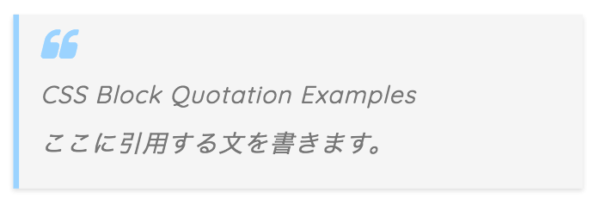
3. 少しカラフルなカード風に
コードを表示
blockquote {
    position: relative;
    padding: 35px 15px 10px 15px;
    box-sizing: border-box;
    font-style: italic;
    background: #f5f5f5;
    color: #777777;
    border-left: 4px solid #9dd4ff;
    box-shadow: 0 2px 4px rgba(0, 0, 0, 0.14);
}

blockquote::before{
    display: inline-block;
    position: absolute;
    top: 10px;
    left: 15px;
    content: "\f10d";
    font-family: "Font Awesome 7 Free";
    font-style: normal;
    color: #9dd4ff;
    font-size: 28px;
    line-height: 1;
    font-weight: 900;
}

blockquote p {
    padding: 0;
    margin: 7px 0;
    line-height: 1.7;
}

blockquote + .blockquote-source {
    display: block;
    text-align: right;
    color: #888888;
    font-size: 0.9em;
}blockquote {
position: relative;
padding: 35px 15px 10px 15px;
box-sizing: border-box;
font-style: italic;
background: #f5f5f5;
color: #777777;
border-left: 4px solid #9dd4ff;
box-shadow: 0 2px 4px rgba(0, 0, 0, 0.14);
}
blockquote::before{
display: inline-block;
position: absolute;
top: 5px;
left: 3px;
content: "“";
font-family: sans-serif;
color: #9dd4ff;
font-size: 90px;
line-height: 1;
}
blockquote p {
padding: 0;
margin: 7px 0;
line-height: 1.7;
}
blockquote + .blockquote-source {
display: block;
text-align: right;
color: #888888;
font-size: 0.9em;
}影をつけて、少し浮き上がったように見せています。色は好みで変えてくださいませ(CSSの#9dd4ffで水色を指定しているので、これを好きな色コードに変えればOKです)。
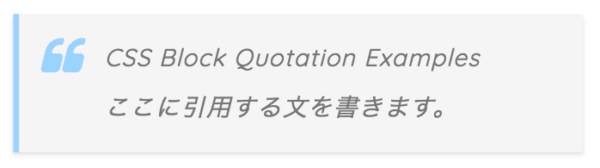
4. 引用符を横に
コードを表示
blockquote {
    position: relative;
    padding: 10px 15px 10px 60px;
    box-sizing: border-box;
    font-style: italic;
    background: #f5f5f5;
    color: #777777;
    border-left: 4px solid #9dd4ff;
    box-shadow: 0 2px 4px rgba(0, 0, 0, 0.14);
}

blockquote::before{
    display: inline-block;
    position: absolute;
    top: 15px;
    left: 15px;
    content: "\f10d";
    font-family: "Font Awesome 7 Free";
    font-style: normal;
    color: #9dd4ff;
    font-size: 30px;
    line-height: 1;
    font-weight: 900;
}

blockquote p {
    padding: 0;
    margin: 7px 0;
    line-height: 1.7;
}

blockquote + .blockquote-source {
    display: block;
    text-align: right;
    color: #888888;
    font-size: 0.9em;
}blockquote {
position: relative;
padding: 10px 15px 10px 60px;
box-sizing: border-box;
font-style: italic;
background: #f5f5f5;
color: #777777;
border-left: 4px solid #9dd4ff;
box-shadow: 0 2px 4px rgba(0, 0, 0, 0.14);
}
blockquote::before{
display: inline-block;
position: absolute;
top: 7px;
left: 0;
content: "“";
font-family: sans-serif;
color: #9dd4ff;
font-size: 90px;
line-height: 1;
}
blockquote p {
padding: 0;
margin: 7px 0;
line-height: 1.7;
}
blockquote + .blockquote-source {
display: block;
text-align: right;
color: #888888;
font-size: 0.9em;
}同じく引用マークを左に配置したバージョンです。
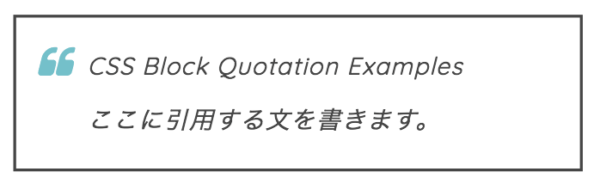
5. スマート
コードを表示
blockquote {
    position: relative;
    padding: 10px 15px 10px 50px;
    box-sizing: border-box;
    font-style: italic;
    border: solid 2px #464646;
    color: #464646;
}

blockquote::before{
    display: inline-block;
    position: absolute;
    top: 20px;
    left: 15px;
    content: "\f10d";
    font-family: "Font Awesome 7 Free";
    font-style: normal;
    color: #77c0c9;
    font-size: 25px;
    line-height: 1;
    font-weight: 900;
}

blockquote p {
    padding: 0;
    margin: 10px 0;
    line-height: 1.7;
}

blockquote + .blockquote-source {
    display: block;
    text-align: right;
    color: #888888;
    font-size: 0.9em;
}blockquote {
position: relative;
padding: 10px 15px 10px 50px;
box-sizing: border-box;
font-style: italic;
border: solid 2px #464646;
color: #464646;
}
blockquote::before{
display: inline-block;
position: absolute;
top: 10px;
left: 0;
content: "“";
font-family: sans-serif;
color: #77c0c9;
font-size: 90px;
line-height: 1;
}
blockquote p {
padding: 0;
margin: 10px 0;
line-height: 1.7;
}
blockquote + .blockquote-source {
display: block;
text-align: right;
color: #888888;
font-size: 0.9em;
}締まった雰囲気を出したいときに使うのがおすすめです。引用符の色(blockquote::before {color:~}の部分)は、サイトに雰囲気に合わせて変えると良いでしょう。
6. 少しカラフルに
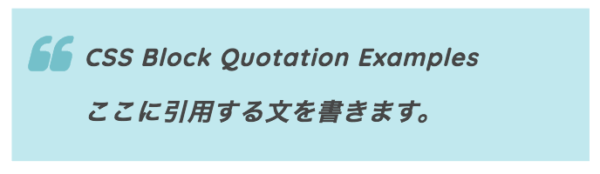
コードを表示
blockquote {
    position: relative;
    padding: 10px 15px 10px 50px;
    box-sizing: border-box;
    font-style: italic;
    color: #464646;
    background: #c2e8ed;
    font-weight: bold;
}

blockquote::before{
    display: inline-block;
    position: absolute;
    top: 17px;
    left: 11px;
    content: "\f10d";
    font-family: "Font Awesome 7 Free";
    font-style: normal;
    color: #77c0c9;
    font-size: 30px;
    line-height: 1;
    font-weight: 900;
}

blockquote p {
    padding: 0;
    margin: 10px 0;
    line-height: 1.7;
}

blockquote + .blockquote-source {
    display: block;
    text-align: right;
    color: #888888;
    font-size: 0.9em;
}blockquote {
position: relative;
padding: 10px 15px 10px 50px;
box-sizing: border-box;
font-style: italic;
color: #464646;
background: #c2e8ed;
font-weight: bold;
}
blockquote::before{
display: inline-block;
position: absolute;
top: 12px;
left: 0px;
content: "“";
font-family: sans-serif;
color: #77c0c9;
font-size: 70px;
line-height: 1;
}
blockquote p {
padding: 0;
margin: 10px 0;
line-height: 1.7;
}
blockquote + .blockquote-source {
display: block;
text-align: right;
color: #888888;
font-size: 0.9em;
}背景を少し濃い目の色で塗っています。文字は見えづらくならないように太字にしています。
7. 力強いデザインに
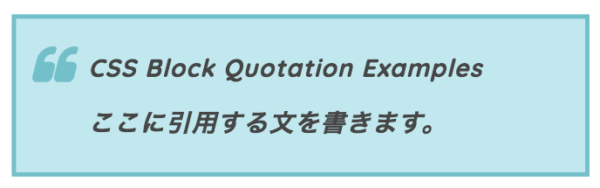
コードを表示
blockquote {
    position: relative;
    padding: 10px 15px 10px 50px;
    box-sizing: border-box;
    font-style: italic;
    font-weight: bold;
    color: #464646;
    background: #c2e8ed;
    border: solid 3px #77c0c9;
}

blockquote::before{
    display: inline-block;
    position: absolute;
    top: 17px;
    left: 11px;
    content: "\f10d";
    font-family: "Font Awesome 7 Free";
    font-style: normal;
    color: #77c0c9;
    font-size: 30px;
    line-height: 1;
    font-weight: 900;
}

blockquote p {
    padding: 0;
    margin: 10px 0;
    line-height: 1.7;
}

blockquote + .blockquote-source {
    display: block;
    text-align: right;
    color: #888888;
    font-size: 0.9em;
}blockquote {
position: relative;
padding: 10px 15px 10px 50px;
box-sizing: border-box;
font-style: italic;
font-weight: bold;
color: #464646;
background: #c2e8ed;
border: solid 3px #77c0c9;
}
blockquote::before{
display: inline-block;
position: absolute;
top: 12px;
left: 0;
content: "“";
font-family: sans-serif;
color: #77c0c9;
font-size: 70px;
line-height: 1;
}
blockquote p {
padding: 0;
margin: 10px 0;
line-height: 1.7;
}
blockquote + .blockquote-source {
display: block;
text-align: right;
color: #888888;
font-size: 0.9em;
}太めの枠で囲むとさらに力強いデザインになります。やや派手なので、使いどころは選ぶかもしれませんね。
8. 引用符をボックス上に
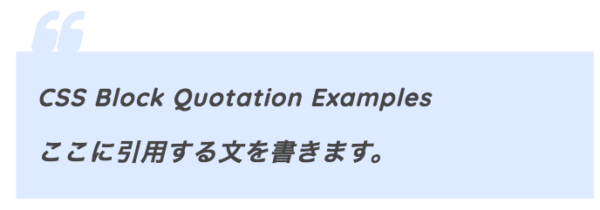
コードを表示
blockquote {
    position: relative;
    padding: 8px 15px;
    margin: 2.5em;
    box-sizing: border-box;
    font-style: italic;
    color: #464646;
    background: #ddeaff;
    font-weight: bold;
}

blockquote::before{
    display: inline-block;
    position: absolute;
    top: -30px;
    left: 11px;
    content: "\f10d";
    font-family: "Font Awesome 7 Free";
    font-style: normal;
    color: #ddeaff;
    font-size: 35px;
    line-height: 1;
    font-weight: 900;
}

blockquote p {
    padding: 0;
    margin: 10px 0;
    line-height: 1.7;
}

blockquote + .blockquote-source {
    display: block;
    text-align: right;
    color: #888888;
    font-size: 0.9em;
}blockquote {
position: relative;
padding: 8px 15px;
margin: 2.5em;
box-sizing: border-box;
font-style: italic;
color: #464646;
background: #ddeaff;
font-weight: bold;
}
blockquote::before{
display: inline-block;
position: absolute;
top: -35px;
left: 0px;
content: "“";
font-family: sans-serif;
color: #ddeaff;
font-size: 90px;
line-height: 1;
}
blockquote p {
padding: 0;
margin: 10px 0;
line-height: 1.7;
}
blockquote + .blockquote-source {
display: block;
text-align: right;
color: #888888;
font-size: 0.9em;
}左上からピョコンと引用符がはみ出るようなデザインです。少し分かりづらいですかね。
9. 引用符を白抜き
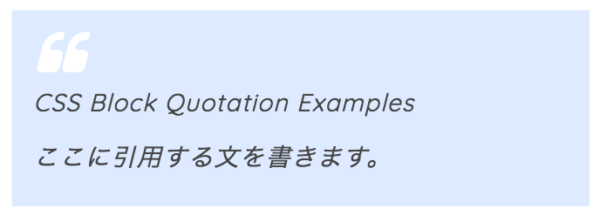
コードを表示
blockquote {
position: relative;
    padding: 40px 10px 10px 15px;
    box-sizing: border-box;
    font-style: italic;
    color: #464646;
    background: #ddeaff;
}

blockquote::before{
    display: inline-block;
    position: absolute;
    top: 13px;
    left: 17px;
    content: "\f10d";
    font-family: "Font Awesome 7 Free";
    font-style: normal;
    color: #FFF;
    font-size: 35px;
    line-height: 1;
    font-weight: 900;
}

blockquote p {
    padding: 0;
    margin: 10px 0;
    line-height: 1.7;
}

blockquote + .blockquote-source {
    display: block;
    text-align: right;
    color: #888888;
    font-size: 0.9em;
}blockquote {
position: relative;
padding: 40px 10px 10px 15px;
box-sizing: border-box;
font-style: italic;
color: #464646;
background: #ddeaff;
}
blockquote::before{
display: inline-block;
position: absolute;
top: 10px;
left: 0px;
content: "“";
font-family: sans-serif;
color: #FFF;
font-size: 90px;
line-height: 1;
}
blockquote p {
padding: 0;
margin: 10px 0;
line-height: 1.7;
}
blockquote + .blockquote-source {
display: block;
text-align: right;
color: #888888;
font-size: 0.9em;
}比較的使いやすいデザインかと思います。背景色(blockquote {background: #ddeaff;})は必要に応じて変えてくださいませ。
10. 角の削れたデザイン
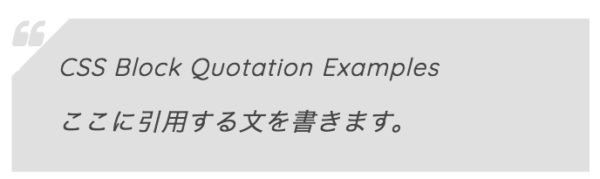
コードを表示
blockquote {
    position: relative;
    padding: 10px 10px 10px 32px;
    box-sizing: border-box;
    font-style: italic;
    color: #464646;
    background: #e0e0e0;
}

blockquote::before{
    display: inline-block;
    position: absolute;
    top: 0;
    left: 0;
    content: "\f10d";
    font-family: "Font Awesome 7 Free";
    font-style: normal;
    color: #e0e0e0;
    font-size: 22px;
    line-height: 1;
    z-index: 2;
    font-weight: 900;
}

blockquote::after{
    position: absolute;
    content: '';
    left: 0;
    top: 0;
    border-width: 0 0 40px 40px;
    border-style: solid;
    border-color: transparent #ffffff;
}

blockquote p {
    position: relative;
    padding: 0;
    margin: 10px 0;
    z-index: 3;
    line-height: 1.7;
}

blockquote + .blockquote-source {
    display: block;
    text-align: right;
    color: #888888;
    font-size: 0.9em;
}blockquote {
position: relative;
padding: 10px 10px 10px 32px;
box-sizing: border-box;
font-style: italic;
color: #464646;
background: #e0e0e0;
}
blockquote::before{
display: inline-block;
position: absolute;
top: -6px;
left: -15px;
content: "“";
font-family: sans-serif;
color: #e0e0e0;
font-size: 70px;
line-height: 1;
z-index: 2;
}
blockquote::after{
position: absolute;
content: '';
left: 0;
top: 0;
border-width: 0 0 40px 40px;
border-style: solid;
border-color: transparent #ffffff;
}
blockquote p {
position: relative;
padding: 0;
margin: 10px 0;
z-index: 3;
line-height: 1.7;
}
blockquote + .blockquote-source {
display: block;
text-align: right;
color: #888888;
font-size: 0.9em;
}少しユニークな見た目にしてみました。目を引きたい場合にご利用くださいませ。
11. ホックスの角に丸い引用マーク
Font Awesome版のみ
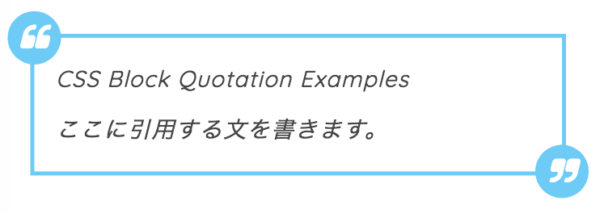
コードを表示
blockquote {
    position: relative;
    padding: 7px 16px;
    box-sizing: border-box;
    font-style: italic;
    color: #464646;
    border: solid 3px #72ccf4;
}

blockquote::before{
    display: inline-block;
    position: absolute;
    top: -20px;
    left: -20px;
    width: 40px;
    height: 40px;
    line-height: 40px;
    border-radius: 50%;
    text-align: center;
    content: "\f10d";
    font-family: "Font Awesome 7 Free";
    font-style: normal;
    background: #72ccf4;
    color: #FFF;
    font-size: 22px;
    font-weight: 900;
}

blockquote::after{
    display: inline-block;
    position: absolute;
    bottom: -20px;
    right: -20px;
    width: 40px;
    height: 40px;
    line-height: 40px;
    border-radius: 50%;
    text-align: center;
    content: "\f10e";
    font-family: "Font Awesome 7 Free";
    font-style: normal;
    background: #72ccf4;
    color: #FFF;
    font-size: 22px;
    font-weight: 900;
}

blockquote p {
    padding: 0;
    margin: 10px 0;
    line-height: 1.7;
}

blockquote + .blockquote-source {
    display: block;
    text-align: right;
    color: #888888;
    font-size: 0.9em;
}かわいく見せたいときに使うと良いでしょう。引用マークは左上だけでも良いかもしれません(blockquote:after {~}をまるっと削除すれば右下のマークは消えます)。
12. モノクロバージョン
Font Awesome版のみ
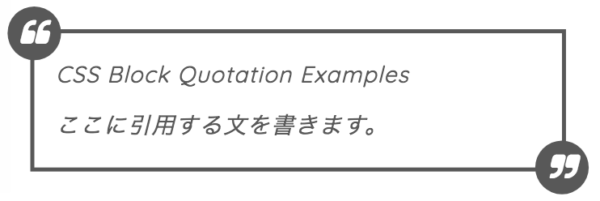
コードを表示
blockquote {
    position: relative;
    padding: 7px 16px;
    box-sizing: border-box;
    font-style: italic;
    color: #585858;
    border: solid 3px #585858;
}
blockquote::before{
    display: inline-block;
    position: absolute;
    top: -20px;
    left: -20px;
    width: 40px;
    height: 40px;
    line-height: 40px;
    border-radius: 50%;
    text-align: center;
    content: "\f10d";
    font-family: "Font Awesome 7 Free";
    font-style: normal;
    background: #585858;
    color: #FFF;
    font-size: 22px;

    font-weight: 900;
}

blockquote::after{
    display: inline-block;
    position: absolute;
    bottom: -20px;
    right: -20px;
    width: 40px;
    height: 40px;
    line-height: 40px;
    border-radius: 50%;
    text-align: center;
    content: "\f10e";
    font-family: "Font Awesome 7 Free";
    font-style: normal;
    background: #585858;
    color: #FFF;
    font-size: 22px;
    font-weight: 900;
}

blockquote p {
    padding: 0;
    margin: 10px 0;
    line-height: 1.7;
}

blockquote + .blockquote-source {
    display: block;
    text-align: right;
    color: #888888;
    font-size: 0.9em;
}
白黒版です。こちらも必要に応じて右下の引用マークを消してくださいませ。
13. メリハリのあるデザインに
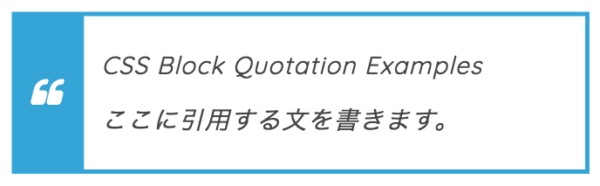
コードを表示
blockquote {
    position: relative;
    padding: 10px 12px;
    box-sizing: border-box;
    font-style: italic;
    color: #464646;
    border: solid 3px #3ca5d4;
    border-left-width: 50px;
}

blockquote::before{
    display: inline-block;
    position: absolute;
    top: 50%;
    left: -37px;


    transform: translateY(-50%);
    content: "\f10d";
    font-family: "Font Awesome 7 Free";
    font-style: normal;
    color: #FFF;
    font-size: 22px;
    line-height: 1;
    font-weight: 900;
}

blockquote p {
    position: relative;
    padding: 0;
    margin: 10px 0;
    z-index: 3;
    line-height: 1.7;
}

blockquote + .blockquote-source {
    display: block;
    text-align: right;
    color: #888888;
    font-size: 0.9em;
}blockquote {
position: relative;
padding: 10px 12px;
box-sizing: border-box;
font-style: italic;
color: #464646;
border: solid 3px #3ca5d4;
border-left-width: 50px;
}
blockquote::before{
display: inline-block;
position: absolute;
top: 50%;
left: -55px;
transform: translateY(-50%);
content: "“";
font-family: sans-serif;
color: #FFF;
font-size: 90px;
line-height: 1;
}
blockquote p {
position: relative;
padding: 0;
margin: 10px 0;
z-index: 3;
line-height: 1.7;
}
blockquote + .blockquote-source {
display: block;
text-align: right;
color: #888888;
font-size: 0.9em;
}引用を示す部分と文章をはっきりと分けてみました。比較的使いやすいのではないでしょうか。borderプロパティのカラーコード「#3ca5d4」を書き換えることで、色を変えることができます。
14. 背景を薄く塗りつぶした場合
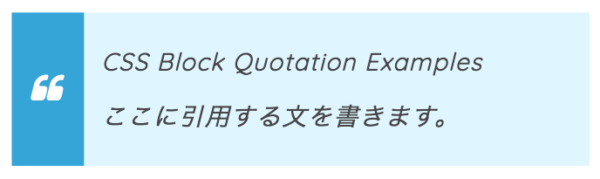
コードを表示
blockquote {
    position: relative;
    padding: 10px 12px;
    box-sizing: border-box;
    font-style: italic;
    color: #464646;
    border-left: solid 50px #3ca5d4;
    background: #e0f5ff;
}

blockquote::before{
    display: inline-block;
    position: absolute;
    top: 50%;
    left: -37px;


    transform: translateY(-50%);
    content: "\f10d";
    font-family: "Font Awesome 7 Free";
    font-style: normal;
    color: #FFF;
    font-size: 22px;
    line-height: 1;
    font-weight: 900;
}

blockquote p {
    position: relative;
    padding: 0;
    margin: 10px 0;
    z-index: 3;
    line-height: 1.7;
}

blockquote + .blockquote-source {
    display: block;
    text-align: right;
    color: #888888;
    font-size: 0.9em;
}blockquote {
position: relative;
padding: 10px 12px;
box-sizing: border-box;
font-style: italic;
color: #464646;
border-left: solid 50px #3ca5d4;
background: #e0f5ff;
}
blockquote::before{
display: inline-block;
position: absolute;
top: 50%;
left: -55px;
transform: translateY(-50%);
content: "“";
font-family: sans-serif;
color: #FFF;
font-size: 90px;
line-height: 1;
}
blockquote p {
position: relative;
padding: 0;
margin: 10px 0;
z-index: 3;
line-height: 1.7;
}
blockquote + .blockquote-source {
display: block;
text-align: right;
color: #888888;
font-size: 0.9em;
}線を使わずに塗りつぶしてみました。形はさきほどと同じです。
15. モノクロ+影
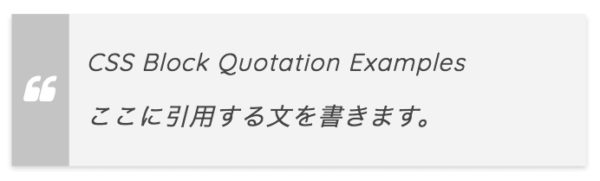
コードを表示
blockquote {
    position: relative;
    padding: 10px 12px;
    box-sizing: border-box;
    font-style: italic;
    color: #464646;
    border-left: solid 40px #c4c4c4;
    background: #f3f3f3;
    box-shadow: 0 2px 4px rgba(0, 0, 0, 0.19);
}

blockquote::before{
    display: inline-block;
    position: absolute;
    top: 50%;
    left: -32px;


    transform: translateY(-50%);
    content: "\f10d";
    font-family: "Font Awesome 7 Free";
    font-style: normal;
    color: #FFF;
    font-size: 22px;
    line-height: 1;
    font-weight: 900;
}

blockquote p {
    position: relative;
    padding: 0;
    margin: 10px 0;
    z-index: 3;
    line-height: 1.7;
}

blockquote + .blockquote-source {
    display: block;
    text-align: right;
    color: #888888;
    font-size: 0.9em;
}blockquote {
position: relative;
padding: 10px 12px;
box-sizing: border-box;
font-style: italic;
color: #464646;
border-left: solid 40px #c4c4c4;
background: #f3f3f3;
box-shadow: 0 2px 4px rgba(0, 0, 0, 0.19);
}
blockquote::before{
display: inline-block;
position: absolute;
top: 50%;
left: -48px;
transform: translateY(-50%);
content: "“";
font-family: sans-serif;
color: #FFF;
font-size: 80px;
line-height: 1;
}
blockquote p {
position: relative;
padding: 0;
margin: 10px 0;
z-index: 3;
line-height: 1.7;
}
blockquote + .blockquote-source {
display: block;
text-align: right;
color: #888888;
font-size: 0.9em;
}質素な見た目にして、影をつけています。影が不要であれば、box-shadow:~;を削除してくださいませ。
16. 爽やか
Font Awesome版のみ
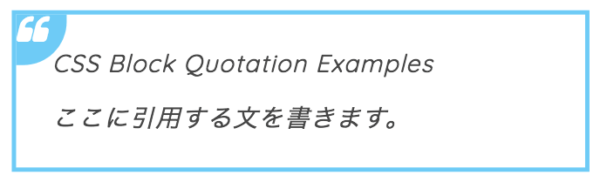
コードを表示
blockquote {
    position: relative;
    padding: 10px 25px;
    box-sizing: border-box;
    font-style: italic;
    color: #464646;
    border: solid 3px #72ccf4;
}

blockquote::before{
    display: inline-block;
    position: absolute;
    top: 0;
    left: 0;
    width: 35px;
    height: 35px;
    border-radius: 0 0 30px;
    content: "\f10d";
    font-family: "Font Awesome 7 Free";
    font-style: normal;
    background: #72ccf4;
    color: #FFF;
    font-size: 22px;
    line-height: 1;
    font-weight: 900;
}

blockquote p {
    position: relative;
    padding: 0;
    margin: 10px 0;
    z-index: 3;
    line-height: 1.7;
}

blockquote + .blockquote-source {
    display: block;
    text-align: right;
    color: #888888;
    font-size: 0.9em;
}
引用符を少しユニークな形にして、左角に配置しました。柔らかい雰囲気を出したいときに使うのが良いでしょう。
17. 引用符を丸で囲った場合
Font Awesome版のみ
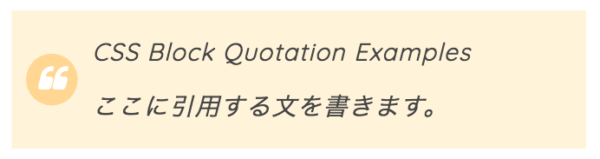
コードを表示
blockquote {
    position: relative;
    padding: 5px 12px 5px 56px;
    box-sizing: border-box;
    font-style: italic;
    color: #464646;
    background: #fff4db;
}

blockquote::before{
    display: inline-block;
    position: absolute;
    top: 50%;
    left: 10px;
    width: 36px;
    height: 36px;


    transform: translateY(-50%);
    text-align: center;
    content: "\f10d";
    font-family: "Font Awesome 7 Free";
    font-style: normal;
    color: #FFF;
    font-size: 20px;
    line-height: 36px;
    background: #ffd596;
    border-radius: 50%;
    font-weight: 900;
}

blockquote p {
    position: relative;
    padding: 0;
    margin: 10px 0;
    z-index: 3;
    line-height: 1.7;
}

blockquote + .blockquote-source {
    display: block;
    text-align: right;
    color: #888888;
    font-size: 0.9em;
}
引用符を円で囲み、オレンジ系統でまとめてみました。
18. ピンクバージョン
Font Awesome版のみ
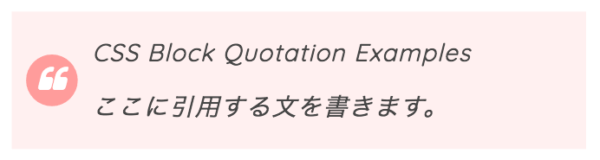
コードを表示
blockquote {
    position: relative;
    padding: 5px 12px 5px 56px;
    box-sizing: border-box;
    font-style: italic;
    color: #464646;
    background: #fff0f0;
}

blockquote::before{
    display: inline-block;
    position: absolute;
    top: 50%;
    left: 10px;
    width: 36px;
    height: 36px;


    transform: translateY(-50%);
    text-align: center;
    content: "\f10d";
    font-family: "Font Awesome 7 Free";
    font-style: normal;
    color: #FFF;
    font-size: 20px;
    line-height: 36px;
    background: #ff9d9d;
    border-radius: 50%;
    font-weight: 900;
}

blockquote p {
    position: relative;
    padding: 0;
    margin: 10px 0;
    z-index: 3;
    line-height: 1.7;
}

blockquote + .blockquote-source {
    display: block;
    text-align: right;
    color: #888888;
    font-size: 0.9em;
}
さきほどの色違いです。ウェブサイトの雰囲気に合わせて選んで頂ければと思います。
19. 青バージョン
Font Awesome版のみ
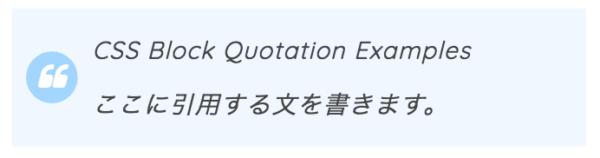
コードを表示
blockquote {
    position: relative;
    padding: 5px 12px 5px 56px;
    box-sizing: border-box;
    font-style: italic;
    color: #464646;
    background: #f0f7ff;
}

blockquote::before{
    display: inline-block;
    position: absolute;
    top: 50%;
    left: 10px;
    width: 36px;
    height: 36px;


    transform: translateY(-50%);
    text-align: center;
    content: "\f10d";
    font-family: "Font Awesome 7 Free";
    font-style: normal;
    color: #FFF;
    font-size: 20px;
    line-height: 36px;
    background: #a5d7ff;
    border-radius: 50%;
    font-weight: 900;
}

blockquote p {
    position: relative;
    padding: 0;
    margin: 10px 0;
    z-index: 3;
    line-height: 1.7;
}

blockquote + .blockquote-source {
    display: block;
    text-align: right;
    color: #888888;
    font-size: 0.9em;
}
青バージョンです。1番使いやすい配色かもしれません。
20. 上から吊り下げてみた場合
Font Awesome版のみ
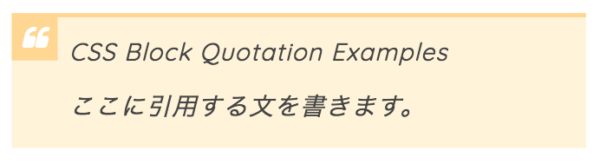
コードを表示
blockquote {
    position: relative;
    padding: 0px 10px 5px 40px;
    box-sizing: border-box;
    font-style: italic;
    color: #464646;
    background: #fff4db;
    border-top: solid 3px #ffd596;
}

blockquote::before{
    display: inline-block;
    position: absolute;
    top: 0;
    left: 0;
    width: 32px;
    height: 30px;
    text-align: center;
    content: "\f10d";
    font-family: "Font Awesome 7 Free";
    font-style: normal;
    color: #FFF;
    font-size: 18px;
    line-height: 30px;
    background: #ffd596;
    font-weight: 900;
}

blockquote p {
    position: relative;
    padding: 0;
    margin: 10px 0;
    z-index: 3;
    line-height: 1.7;
}

blockquote + .blockquote-source {
    display: block;
    text-align: right;
    color: #888888;
    font-size: 0.9em;
}
からぴょこんと垂れ下がったようなレイアウトにしてみました。上の線(border-top)は不要であれば消してくださいませ。
21. ピンクバージョン
Font Awesome版のみ
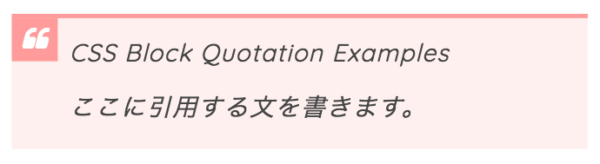
コードを表示
blockquote {
    position: relative;
    padding: 0px 10px 5px 40px;
    box-sizing: border-box;
    font-style: italic;
    color: #464646;
    background: #fff0f0;
    border-top: solid 3px #ff9d9d;
}

blockquote::before{
    display: inline-block;
    position: absolute;
    top: 0;
    left: 0;
    width: 32px;
    height: 30px;
    text-align: center;
    content: "\f10d";
    font-family: "Font Awesome 7 Free";
    font-style: normal;
    color: #FFF;
    font-size: 18px;
    line-height: 30px;
    background: #ff9d9d;
    font-weight: 900;
}

blockquote p {
    position: relative;
    padding: 0;
    margin: 10px 0;
    z-index: 3;
    line-height: 1.7;
}

blockquote + .blockquote-source {
    display: block;
    text-align: right;
    color: #888888;
    font-size: 0.9em;
}
上の色違いのものです。
22. 青バージョン
Font Awesome版のみ
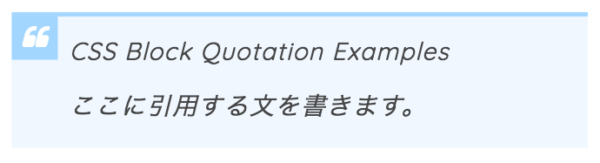
コードを表示
blockquote {
    position: relative;
    padding: 0px 10px 5px 40px;
    box-sizing: border-box;
    font-style: italic;
    color: #464646;
    background: #f0f7ff;
    border-top: solid 3px #a5d7ff;
}

blockquote::before{
    display: inline-block;
    position: absolute;
    top: 0;
    left: 0;
    width: 32px;
    height: 30px;
    text-align: center;
    content: "\f10d";
    font-family: "Font Awesome 7 Free";
    font-style: normal;
    color: #FFF;
    font-size: 18px;
    line-height: 30px;
    background: #a5d7ff;
    font-weight: 900;
}

blockquote p {
    position: relative;
    padding: 0;
    margin: 10px 0;
    z-index: 3;
    line-height: 1.7;
}

blockquote + .blockquote-source {
    display: block;
    text-align: right;
    color: #888888;
    font-size: 0.9em;
}
同様に、色違いのものです。
23. 華やかに
Font Awesome版のみ
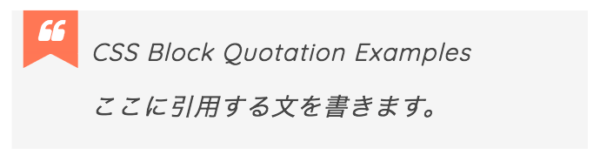
コードを表示
blockquote {
    position: relative;
    padding: 5px 15px 5px 55px;
    box-sizing: border-box;
    font-style: italic;
    color: #464646;
    background: #f5f5f5;
}

blockquote::before{
    display: inline-block;
    position: absolute;
    top: 0;
    left: 8px;
    width: 38px;
    height: 30px;
    text-align: center;
    content: "\f10d";
    font-family: "Font Awesome 7 Free";
    font-style: normal;
    color: #FFF;
    font-size: 18px;
    line-height: 30px;
    background: #ff785b;
    font-weight: 900;
}

blockquote::after{
    content: '';
    position: absolute;
    left: 8px;
    top: 30px;
    height: 0;
    width: 0;
    border-left: 19px solid #ff785b;
    border-right: 19px solid #ff785b;
    border-bottom: 10px solid transparent;
}
blockquote p {
    position: relative;
    padding: 0;
    margin: 10px 0;
    z-index: 3;
    line-height: 1.7;
}

blockquote + .blockquote-source {
    display: block;
    text-align: right;
    color: #888888;
    font-size: 0.9em;
}
リボンをつけたようなデザインにしてみました。少しは派手ですが、目を引くはずです。
24. 少しシックな配色に
Font Awesome版のみ
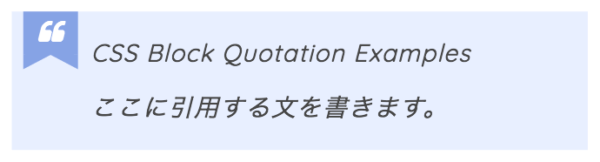
コードを表示
blockquote {
    position: relative;
    padding: 5px 15px 5px 55px;
    box-sizing: border-box;
    font-style: italic;
    color: #464646;
    background: #e8efff;
}

blockquote::before{
    display: inline-block;
    position: absolute;
    top: 0;
    left: 8px;
    width: 38px;
    height: 30px;
    text-align: center;
    content: "\f10d";
    font-family: "Font Awesome 7 Free";
    font-style: normal;
    color: #FFF;
    font-size: 18px;
    line-height: 30px;
    background: #87a4e3;
    font-weight: 900;
}

blockquote::after{
    content: '';
    position: absolute;
    left: 8px;
    top: 30px;
    height: 0;
    width: 0;
    border-left: 19px solid #87a4e3;
    border-right: 19px solid #87a4e3;
    border-bottom: 10px solid transparent;
}

blockquote p {
    position: relative;
    padding: 0;
    margin: 10px 0;
    z-index: 3;
    line-height: 1.7;
}

blockquote + .blockquote-source {
    display: block;
    text-align: right;
    color: #888888;
    font-size: 0.9em;
}
さきほどと形は同じですが、落ち着きのある配色にしてみました。
25. 紙が折り込まれたようなデザインに
Font Awesome版のみ
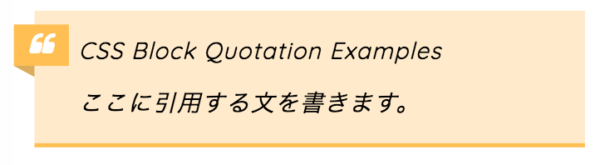
コードを表示
blockquote {
    position: relative;
    padding: 5px 10px 5px 32px;
    box-sizing: border-box;
    font-style: italic;
    background: #ffebcd;
    border-bottom: solid 3px #ffbe5d;
}

blockquote::before{
    display: inline-block;
    position: absolute;
    top: 10px;
    left: -15px;
    width: 40px;
    height: 30px;
    text-align: center;
    content: "\f10d";
    font-family: "Font Awesome 7 Free";
    font-style: normal;
    color: #FFF;
    font-size: 18px;
    line-height: 30px;
    background: #ffbe5d;
    font-weight: 900;
}

blockquote::after{
    position: absolute;
    content: '';
    top: 40px;
    left: -15px;
    border: none;
    border-bottom: solid 8px transparent;
    border-right: solid 15px #daaa64;
}

blockquote p {
    position: relative;
    padding: 0;
    margin: 10px 0;
    z-index: 3;
    line-height: 1.7;
}

blockquote + .blockquote-source {
    display: block;
    text-align: right;
    color: #888888;
    font-size: 0.9em;
}
横から紙が折り込まれているようなデザインです。必要に応じてボックスの下線(blockquote のborder-bottom:~;)を削除してもらえればと思います。
26. 影を付けたみた場合
Font Awesome版のみ
コードを表示
blockquote {
    position: relative;
    padding: 5px 10px 5px 32px;
    box-sizing: border-box;
    font-style: italic;
    background: #f3f3f3;
    box-shadow: 0 3px 4px rgba(0, 0, 0, 0.15);
}

blockquote::before{
    display: inline-block;
    position: absolute;
    top: 10px;
    left: -15px;
    width: 40px;
    height: 30px;
    text-align: center;
    content: "\f10d";
    font-family: "Font Awesome 7 Free";
    font-style: normal;
    color: #FFF;
    font-size: 18px;
    line-height: 30px;
    background: #92d4ff;
    box-shadow: 0 2px 2px rgba(26, 26, 26, 0.14);
    font-weight: 900;
}

blockquote::after{
    position: absolute;
    content: '';
    top: 40px;
    left: -15px;
    border: none;
    border-bottom: solid 8px transparent;
    border-right: solid 15px #6eb3e0;
}

blockquote p {
    position: relative;
    padding: 0;
    margin: 10px 0;
    z-index: 3;
    line-height: 1.7;
}

blockquote + .blockquote-source {
    display: block;
    text-align: right;
    color: #888888;
    font-size: 0.9em;
}
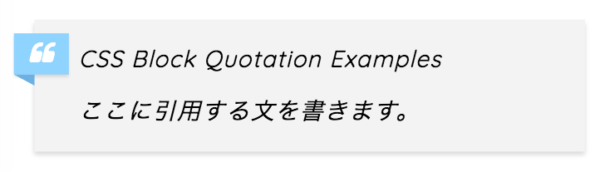
使いやすい配色にして、さらに影をつけてみました。より奥行きがあるように 見えるはずです。
27. 上から折り込んだ場合
Font Awesome版のみ
コードを表示
blockquote {
    position: relative;
    padding: 15px 10px 5px;
    box-sizing: border-box;
    font-style: italic;
    background: #f3f3f3;
}

blockquote::before{
    display: inline-block;
    position: absolute;
    top: -8px;
    left: 9px;
    width: 40px;
    height: 30px;
    text-align: center;
    content: "\f10d";
    font-family: "Font Awesome 7 Free";
    font-style: normal;
    color: #FFF;
    font-size: 18px;
    line-height: 30px;
    background: #6fcdd9;
    font-weight: 900;
}

blockquote::after{
    position: absolute;
    content: '';
    top: -8px;
    left: 49px;
    border: none;
    border-bottom: solid 8px #6cacb5;
    border-right: solid 9px transparent;
}

blockquote p {
    position: relative;
    padding: 0;
    margin: 10px 0;
    z-index: 3;
    line-height: 1.7;
}

blockquote + .blockquote-source {
    display: block;
    text-align: right;
    color: #888888;
    font-size: 0.9em;
}
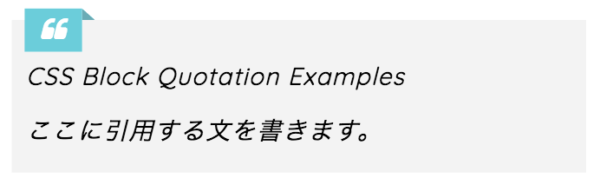
上から折り目のついて紙がかかっているような見た目にしてみました。目を引くわりに派手すぎず使いやすいかもしれません。
28. 引用符を背景に大きく配置
コードを表示
blockquote {
    position: relative;
    padding: 10px 20px;
    box-sizing: border-box;
    font-style: italic;
    color: #4e4e4e;
    background: #fff3e1;
}

blockquote::before{
    display: inline-block;
    position: absolute;
    top: 7px;
    left: 10px;
    content: "\f10d";
    font-family: "Font Awesome 7 Free";
    font-style: normal;
    color: #ffe2b8;
    font-size: 58px;
    line-height: 1;
    font-weight: 900;
}

blockquote::after{
    display: inline-block;
    position: absolute;
    bottom: 5px;
    right: 15px;
    text-align: center;
    content: "\f10e";
    font-family: "Font Awesome 7 Free";
    font-style: normal;
    color: #ffe2b8;
    font-size: 40px;
    line-height: 1;
    font-weight: 900;
}

blockquote p {
    position: relative;
    padding: 0;
    margin: 10px 0;
    z-index: 3;
    line-height: 1.7;
}

blockquote + .blockquote-source {
    position: relative;
    z-index: 3;
    display: block;
    text-align: right;
    color: #888888;
    font-size: 0.9em;
}blockquote {
position: relative;
padding: 10px 20px;
box-sizing: border-box;
font-style: italic;
color: #4e4e4e;
background: #fff3e1;
}
blockquote::before{
display: inline-block;
position: absolute;
top: 0;
left: -10px;
content: "“";
font-family: sans-serif;
color: #ffe2b8;
font-size: 130px;
line-height: 1;
}
blockquote::after{
display: inline-block;
position: absolute;
bottom: -40px;
right: 20px;
text-align: center;
content: "”";
font-family: sans-serif;
color: #ffe2b8;
font-size: 90px;
line-height: 1;
}
blockquote p {
position: relative;
padding: 0;
margin: 10px 0;
z-index: 3;
line-height: 1.7;
}
blockquote + .blockquote-source {
position: relative;
z-index: 3;
display: block;
text-align: right;
color: #888888;
font-size: 0.9em;
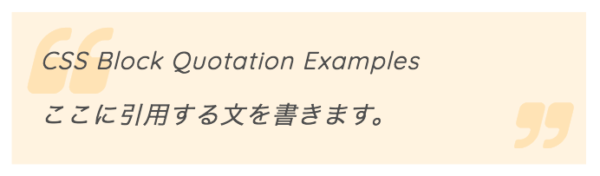
}引用符を思い切って大きくし、さらに文字の下に少し配置してみました。少し読みづらいかもしれませんが、その分ボックスのサイズはミニマムになります。
29. かわいい配色に
コードを表示
blockquote {
    position: relative;
    padding: 10px 20px;
    box-sizing: border-box;
    font-style: italic;
    color: #4e4e4e;
    background: #fff0f0;
}

blockquote::before{
    display: inline-block;
    position: absolute;
    top: 7px;
    left: 10px;
    content: "\f10d";
    font-family: "Font Awesome 7 Free";
    font-style: normal;
    color: #ffdfdf;
    font-size: 58px;
    line-height: 1;
    font-weight: 900;
}

blockquote::after{
    display: inline-block;
    position: absolute;
    bottom: 5px;
    right: 15px;
    text-align: center;
    content: "\f10e";
    font-family: "Font Awesome 7 Free";
    font-style: normal;
    color: #ffdfdf;
    font-size: 40px;
    line-height: 1;
    font-weight: 900;
}

blockquote p {
    position: relative;
    padding: 0;
    margin: 10px 0;
    z-index: 3;
    line-height: 1.7;
}

blockquote + .blockquote-source {
    position: relative;
    z-index: 3;
    display: block;
    text-align: right;
    color: #888888;
    font-size: 0.9em;
}blockquote {
position: relative;
padding: 10px 20px;
box-sizing: border-box;
font-style: italic;
color: #4e4e4e;
background: #fff0f0;
}
blockquote::before{
display: inline-block;
position: absolute;
top: 0;
left: -10px;
content: "“";
font-family: sans-serif;
color: #ffdfdf;
font-size: 130px;
line-height: 1;
}
blockquote::after{
display: inline-block;
position: absolute;
bottom: -40px;
right: 20px;
text-align: center;
content: "”";
font-family: sans-serif;
color: #ffdfdf;
font-size: 90px;
line-height: 1;
}
blockquote p {
position: relative;
padding: 0;
margin: 10px 0;
z-index: 3;
line-height: 1.7;
}
blockquote + .blockquote-source {
position: relative;
z-index: 3;
display: block;
text-align: right;
color: #888888;
font-size: 0.9em;
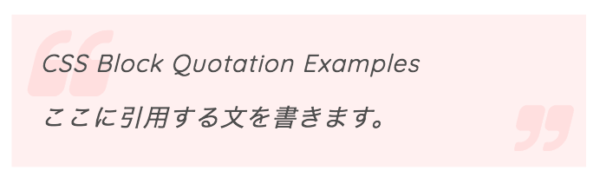
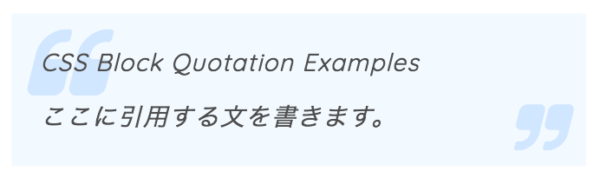
}なんとなく桜っぽい配色にしてみました。
30. 爽やかでやさしい配色に
コードを表示
blockquote {
    position: relative;
    padding: 10px 20px;
    box-sizing: border-box;
    font-style: italic;
    color: #4e4e4e;
    background: #f2f9ff;
}

blockquote::before{
    display: inline-block;
    position: absolute;
    top: 7px;
    left: 10px;
    content: "\f10d";
    font-family: "Font Awesome 7 Free";
    font-style: normal;
    color: #d2e6ff;
    font-size: 58px;
    line-height: 1;
    font-weight: 900;
}

blockquote::after{
    display: inline-block;
    position: absolute;
    bottom: 5px;
    right: 15px;
    text-align: center;
    content: "\f10e";
    font-family: "Font Awesome 7 Free";
    font-style: normal;
    color: #d2e6ff;
    font-size: 40px;
    line-height: 1;
    font-weight: 900;
}

blockquote p {
    position: relative;
    padding: 0;
    margin: 10px 0;
    z-index: 3;
    line-height: 1.7;
}

blockquote + .blockquote-source {
    position: relative;
    z-index: 3;
    display: block;
    text-align: right;
    color: #888888;
    font-size: 0.9em;
}blockquote {
position: relative;
padding: 10px 20px;
box-sizing: border-box;
font-style: italic;
color: #4e4e4e;
background: #f2f9ff;
}
blockquote::before{
display: inline-block;
position: absolute;
top: 0;
left: -10px;
content: "“";
font-family: sans-serif;
color: #d2e6ff;
font-size: 130px;
line-height: 1;
}
blockquote::after{
display: inline-block;
position: absolute;
bottom: -40px;
right: 20px;
text-align: center;
content: "”";
font-family: sans-serif;
color: #d2e6ff;
font-size: 90px;
line-height: 1;
}
blockquote p {
position: relative;
padding: 0;
margin: 10px 0;
z-index: 3;
line-height: 1.7;
}
blockquote + .blockquote-source {
position: relative;
z-index: 3;
display: block;
text-align: right;
color: #888888;
font-size: 0.9em;
}爽やかで透明感のある配色にしてみました。
最後に
ここまで30個のサンプルを紹介してきました。これらのデザインを使用する際に、当サイトにリンクなどをして頂く必要は特にありません(して頂けるとものすごく喜びますが)。ご自由にお使いください。ただし二次配布はご遠慮ください。